Showing posts with label Software. Show all posts

Friday, March 29, 2013

The Z10–the essence of cool finally coming to Blackberry?

March 2013 has been an interesting month for me.  For a one man show, I’ve been playing around with the Nokia Lumia 920, Microsoft Surface RT and now this, the recently launched Blackberry Z10.

And combined from late 2012, with the very likeable LG Nexus 4 which is very much one of the highest performing smartphones for a relatively small outlay, I came into the Z10 with intrigue, partly prompted by Stephen Fry’s excellent article in which he answers the question of which smartphone he would take with him if he only had a few seconds in a fire situation.

As usual my post is more about my perceptions having only had the device for just short of a week.  I had two main objectives in mind, would I want to use one of these for the corporate day job (for which Blackberry is renowned and secondly, is this cool enough to replace other phones, such as my beloved iPhone 5, which for me is still my go-to device in the-leave-everything-and-choose-one-device situation.

Solid build

Let’s get the specs out of the way – Dual-core brains, 2GB RAM, 16Gb storage expandable to 32GB via a micro SD slot, USB 2.0 port and a HDMI out port.

The display is very very nice. 4.2” 1280 x 768 screen at 356ppi (yes, another one higher than the iPhone Retina display). The hardware spec is completed with an 8Mb front and back camera  and its 4G (LTE) ready.

Two things jump out here. You can take the back off and change battery, SIM, micro SD card.  I forgot how useful that is over the sealed designs set by Apple. Weighing in at 136g, the form factor combined with a lovely rubberised gripped back, the Z10 holds beautifully in hand. Probably the best native feel of a smartphone since its reinvention by Apple.  I no longer reach for a case, because the smartphone feels like a bar of soap in my hands.  In fact, its the first time I don;t actually need a case.

Blackberry 10 OS

Like the other platforms, Blackberry’s key challenge in the touch and gesture related world of mobile devices has been to seek a way of creating its own user experience of distinction which, if applied well, can be done across a range of their own devices.  If done well, it heralds a competitive form of innovation seen across other mobile OS’.

The new OS is centred around the two important centrepieces – the Blackberry Hub and some key gestures.  The BB Hub ties in system notifications, and a unified inbox of updates across mail and social media accounts, a sort of version of the People hub seen in Windows Phone 8 and Android OS’. 

Gestures are based on 2 key actions, swiping up from bottom to close and app and reveal all other open applications (up to nine of them) in a task manager, and secondly, swiping down from the top (to reveal individual applications settings).  Combined with the unlocking of the phone using the swipe up, Blackberry markets these gestures and the hub as a sort of fade in feature between your hub, notifications, open apps and then your app icon stack.  It works really nice. 

Given my steeped history in OS and Android, I liked it. It took a bit of getting used to, but it works well and over time it starts to feel natural, and better that iOS or Android.  For a first release, it does have a few annoying quirks, but they are not off-putting enough.  It’s certainly a welcome change from the go into and out of your apps world which iOS has and I supposed we’re all so used to, it begins to attract the stigma of being stale.

The keyboard, nice – laid out well. Features a number row above the qwerty keyboard so you don’t have to switch.  That parts works well you can see enough on the rest of the screen. Makes a nice sound. Camera and recording (which goes up to 1080P) is broadly as good as everything else on the market.

Blackberry 10 OS? Cracking start Blackberry.

A real shortage of apps

Having said, all of that – the real problem for me with the Z10 and Blackberry OS10 is the even worse paucity for apps than there was on Windows Phone 8 and Windows RT.  It reasonable for Blackberry to want to lock you into their ecosystem of apps, but the reality is to be up in the game, the big software publishers need to develop for Blackberry as a ranking 4th option after iOS, Android and WP8.  Based on my use case, it’s not great, but not that bad.  In everyday terms, for example:

  • I can read BBC News, The Times, Independent and The Guardian and my RSS feeds (although that needs some adjustment in the summer when Google ends the Reader service)
  • Follow up and update my Tweets
  • Watch BBC iPlayer programmes
  • Access Dropbox files and edit them with DocsToGo
  • Connect to a WebEx virtual meeting
  • Check what movies are on at my local picture house
  • Check the weather, train and bus timetables
  • Check my TripIT travel  itinerary
  • Order my groceries from Ocado
  • Sync my iTunes library
  • Of course, buy Blackberry store books, magazines, TV shows, and Movies (yeah, right)

But I can’t –

  • read my Instapaper saved articles
  • access my Evernote notes
  • logon to my personal banking applications
  • stream Spotify music
  • tag Shazam or SoundCloud new music when I hear it
  • control my Sonos music
  • order from Amazon or eBay
  • check IMDB
  • access my Passwords store
  • scan my network for all IPs,

In the grand scheme of things, it could actually just be a question of time for the main publishers to see Blackberry as another ecosystem to viably publish for. I hope this happens as this is a good OS from Blackberry.

The dark horse for the enterprise?

In the company I work at, our strategy like many large blue chips is heavily centred on iOS as the platform for creating and distributing line of business applications to have a real mobile alternative for getting stuff done vs. a laptop. MobileIron is the Gartner Quadrant leading MDM platform supporting both company owned and BYODs which at various releases on its roadmap support iOS, Android, Windows Phone 8 and Blackberry 10.  While our standards are geared for am entire technology stack (e.g mail , device management, and the ability to provide VPN, internal Wi-Fi, and app distribution), it has not gone unnoticed that Blackberry will be pretty much as capable as iOS on the MobileIron MDM at its next release. And this is where for me, it gets interesting. If Blackberry have sufficient traction in the market, then it makes commercial sense for blue chips to listen up and evaluate Blackberry into their mobile device strategy. 

Not because Blackberry is offering anything special which blows the competition away – far from it (but in a good way). But because from a value proposition in terms of cost, ease of integration, and as a favoured corporate road warrior tool, Blackberry has a chance – in fact, a possibly better chance than Android or WP8. The missing piece for Blackberry is to be able to showcase a breadth of quality of consumer apps, which would then drive interest in better business apps. It’s a big ask.

The consumers case

Blackberry started as the corporate brand. As its average selling price fell, it became attractive to the younger generation. As a device and brand which has lost its way, I’m not in a position to say how Blackberry can really get back in the game in the consumer space. The Z10 and its pricing suggest Blackberry are going back in at the premium end of the market.  The product feels that way. The problem is, while the product is good to excellent in places, it does not have enough in the tank to sway new or loyal iOS and Android followers to switch sides. And that alongside the perception of the Blackberry brand, suggests a long road ahead for Blackberry. If they want the consumer to treat Blackberry OS 10 seriously, then a Playbook which marries this one and perhaps an entry point handset means the brand has a joined up plan.

Wrapping Up

When I started this piece, which I expected to be short – I wanted to know if the new Z10 would be a device I’d want to use as my corporate smartphone and if it could replace my iPhone 5 as my main go-to device. Yes to the first question, not quite on the second.  But it must be said a really good effort. Like the Nokia Lumia 920 I previously reviewed, it will be hard to send this one back, given the positive experience I’ve had. This is by no means an exhaustive review, but in the techmobabble way, this is a bloody good device and OS and it deserves success and support from the market. Goodbye RIM, hello Blackberry.

Sunday, March 17, 2013

Nokia’s comeback kid – Lumia 920 & Windows Phone 8

With the ascent of iOS and Android as the leading mobile operating systems powering smartphones and tablets, it easier to to write off the work which Microsoft and Nokia (alongside HTC and other OEMs) have been doing in getting Windows Phone 8 as a major player in the market place. It wasn’t until working with some fine colleagues in Germany and Italy who have been seriously considering Windows Phone 8 as the core platform to replace Blackberry devices, did I start to think that I’ve been blind sided in really understanding the increasing consumers and enterprises appeal of Microsoft’s revamped attempts to make a real player out of this.  I tell you now, why Microsoft didn’t use WP8 as the OS for its tablet devices is beyond me.

Enterprises would clearly be attracted by Microsoft’s partnership with them in terms of enterprise licensing agreements, ease of platform and device integration into their corporate infrastructures notably Exchange, Lync and SharePoint.  But Microsoft has focused on the consumer market with its first release of WP8.  Yes, consumers are driving the demand in the enterprise.

And of course, consumers are driven by unique mixture of needs and wants. Smartphones are upgradeable accessories, and given the intimacy of this single device in the lives of most people in western and emerging economies, driving the multiple forces of social, web and cloud. What does this mean? Smartphones are increasingly driving innovation in term of being fresh and fun to use with life via apps. I’d even succumbed – while I love my iOS devices, and have been seriously impressed with the current generation of Android hardware and software, I had to take a up close and personal look at Windows 8 and its metro UI. It offers something head turning that I wanted to geek out on.  What follows is not a warts and all of every feature of the Lumia 920 or/and the Windows Phone OS itself, just what it means in terms of how I use it and most importantly, is it worth keeping.

Lumia 920 hardware

The Lumia 920 is big. Fat big. For a large handed person like me, it’s substantial in the hand. You don’t feel you’re going to drop it. Yes, it’s a lot larger and weightier, but that does not always need to be seen as a bag thing,  It’s outer material is made of a single slab of colored polycarbonate. Combined with my rubberised case, I’ve been running with the ‘920 and it feels solid.

The 4.5 inch screen with a 336 ppi 1280 x 768 resolution (yes higher than Retina iPhone) is just gorgeous. WP8 on it uses a 800x400 pixel set s that its UI elements appear larger and more spaced out. It works for me. As expected it supports 720P HD, and one would expect the next iteration of the flagship to go 1080P like its recent Android rivals.

The other hardware stuff is pretty standard fare – 4G radios, 2.4Ghz Wireless N, 2000mAh battery, 1GB RAM, a plentiful 32Gb of storage and so on.

Sonically, I really liked the ‘920.  Syncing iTunes music and downloading Spotify, confirmed what I reckoned for the device – it hums real nicely.  There was a level of musicality on the device which was on a part of exceeded my experience on Android, certainly far in excess of the iPhones, which always need equalisation to sound reasonable.

The Lumia 920 is a well made phone. May not sculpted to the reduced weight and sleekness of of the iPhone 5, but it’s solid engineering.  Class A build quality. Check.

Windows Phone 8 experience

Having no previous experience with Windows Phone 7, I came into the experience of WP8 as a relative noob, hoping to be blown away and feel fanboy affection once I got used it.  While there were some strange things which happened in getting it set up – for example, I couldn’t set up the Wallet on the device (had to do it on a laptop) and the MehDoh Twitter client had a horrendous screen in authenticating to Twitter, I really liked it.  WP8 is a fresh and easy to pick up UI.  The Metro UI tiles really work and after a few days I become quite attached.  It relatively simple and is intuitive to see how the other gestures work in terms of press and hold for switching apps or revealing sub-commands in an action.  Microsoft, I salute your innovation here. It’s a really good attempt to do something different.

The overall keyboard is a mix or good and bad. Again, I love the soft and tactile touch feel that the ‘920 and WP8 provide, but hasn’t anyone learned properly, that Apple seriously know how keys for an on-screen keyboard should be spaced?  On the ‘920, too cramped.

The software and bugs which do hang and do odd things, and overall its a great effort.  One thing, of the three buttons on WP8 hardware, the Search button is an odd one.  While Android dedicates a button for home screen, going back and a task manager, WP8 forces Nokia and HTC and others to dedicate a Search button.  I use twice, to realise it’s wired for Bing search only.  WTF?!

Applications

My recent list highlights the apps I installed on the device which I can re-install across other WP8 devices, given the cloud back up on apps and settings built into the OS.   The need for better integration across the Windows ecosystem is something I think Microsoft is not really appreciating.  Xbox integration is only one part (I haven’t really played with it), but phones, tablets and desktops are able to share data via SkyDrive, but there is so much more which Microsoft could be doing in terms of offering differing types of on the go uses between the different form factors of Windows 8.

Of notable mention goes to MeTweets and NextGen Reader the Twitter and RSS reader apps.  Nice, just real nice re-imagination of the app using the Metro UI.

The needs of the Enterprise

In my firm, outside of iOS and Android, there are countries in the global organisation which have expressed a strong interest in switching to WP8 devices as the primary devices (i.e.away from Blackberry).  Take Italy for example, talking to the CIO there, shared that through telco and ISPs, the cost of an iPhone (a standard device in my firm), is significantly higher and not cost justifiable from a business standpoint.  WP8 devices are often free with ISP contracts and thereby with its capability for device management and forthcoming integration with middleware products such as IBM Traveler and MobileIron for MDM, it’s an appealing option from a enterprise and consumer perspective.  The Lumia and WP8 support the needs of the enterprise, with hardware, data, traffic and integration with a range of MDM platforms. 

Performance

Geekbench is not on WP8 yet, so no benchmark comparisons can be drawn to iOS and Android device counterparts in terms of hardware and software performance.  But the Lumia 920 and WP8, felt reasonably quick.  Not as fast as iPhone 5 and Nexus 4, but acceptably quick. Apps can take a few seconds too long to load at times (something consistent to Surface RT as per my other post), but caching seems to help significantly.  What you get with the Lumia 920 and WP8 is a smooth fluidity based on Metro.  The Lumia has a soft rubberised curved finish, with a soft tactile feel on button presses and on soft like audible screen clicks.  This dovetails really nice with WP8.

A couple of quirks came out which I thought were odd. Setting the date and time direct from the internet didn’t work. I had to set this manually. Crazy. Secondly, resetting the phone took ages.  After leaving it for 2 hours, I had to restart the ‘920 3 times for the reset to finish. Odd.

Wrapping up

I really liked the Lumia 920, I mean seriously.  It’s feel nice in my big hands, takes good pictures and the screen and software experience is fluid and feels great.  Yes, there is a current paucity of apps in the store, and I think it will improve.  (Sonos – please release a WP8 app – please!).  The ‘920 is due to go back in a week or so.  Think I’m going to struggle with that.

Saturday, March 2, 2013

Two weeks with the Microsoft Surface RT

Surface RT and iPad 3 side by side

In the UK, I had not seen the new Surface RT, so only on looking for one in the high street (such as PC World where it’s not on sale), I was directed to John Lewis where I was told it was available. When I showed up at John Lewis, it was not apparent that it was on display, yet alone on sale. An assistant pulled one out of a glass display cabinet where it was folded up in tablet form in a not very obvious place. So much for John Lewis’ attempts to really sell these.

Why was I so interested? To gain my own day to day experience of Microsoft’s hybrid PC and to decide for myself if this has a) its own value for me b) can hold its own with the competition and c) see where this might fit into consumer or enterprise space.

First impressions

Unboxing the surface, I was impressed. Not totally, but enough to see the attention to detail focused on quality which Microsoft put into this to win over customers. The packaging is very simple and understated with only 2-tones in the outer and inner packaging. Touch Cover, Surface RT and 24W power adaptor are inside alongside light instructions + warranty bits. Very Apple-esque. Liked it.

Switching on and getting started was easy enough,  I signed in with my Hotmail account and connected to the home Wi-Fi, and a few minutes later it was up with the default metro tile arrangement. If anything, given I’m used to the smooth and faultless Apple delivery of a new device start up, it just felt slow – a long negative association I’ve held with Windows going back the years.

Given the Surface RT has been out for a few months and a firmware update had been released, it made sense to put it down onto the machine to ensure I was getting the latest fixes and could baseline my experience accordingly. Shockingly, the firmware update took an hour – yes, I said that - 60 mins to download and install.  At that point, I was not impressed, particularly with blue screen Windows update screen thrown into the mix for familiarity.

Windows RT firmware updates

Beyond that, and having a play for the rest of the day, I’ve been much captivated with the unit and enjoyed the learning curve of discovery and tinkering (what all us geeks love with new kit). 

Getting used to Surface RT & Windows 8


Let’s get past the tech basics – it has this NVIDIA Tegra 3 chip, with 4 cores running at 1.5Ghz, 2GB RAM and my unit is the 64GB model (~46GB usable space). The display runs 1024 x 768 using something called ClearType display (meaning its smooth's out jaggies to make a non Retina resolution look better).  The display is 16:9 which is good in some use cases, but difficult to use in others.  Wireless is 8.02.11n but at 2.4Ghz only so its theoretical maximum for connection and transfer is a 150mbps.

It must be said, having used touch UIs via iOS and Android, my general attitude has always been if the product design is good enough, I should rarely, if ever, reach for a manual or instruction guide,  Looking back over the last few days, I struggled with with navigating Windows 8 UI, which in one sense should not be surprising, but in another sense was because a number of things are not obvious until someone tells you (i.e, the manual).

Gestures for closing apps, displaying two apps side by side, switching apps, the charms bar – are not readily understandable unless some guidance is provided.  Fortunately, Microsoft have recently release a Surface Getting Started Guide, which helped me understand the navigation around this thing to a comfortable level.

Finding applications on RT

This new version of RT means developers now need to need to write for Intel based Windows 8  and the new RT platform, as well as Windows Phone 8 itself. It’s easy to see with the launch and the mixed market response, that apps from the big players are few and far between as the market needs to be convinced that Win 8 RT will thrive.  I had done some checks before getting the unit in and part of my value is in what is available in the app ecosystem of the platform. From that point, and given my investment in iOS, it made sense to compare apps to use across each of platform I have a device. This was never intended to be an exhaustive list, but identify what I must have in order to derive value (blue items).  The exercise in itself did reconfirm how much I am dependent on the app world to access the cloud and the web.

While this is heavily skewed in favour of iOS  and is looking purely at my own choices and needs, then as we move across the different platforms, you can see I’ve found other and in certain cases, useful apps to give me what I want to do on that device.  From the list, it is clear from that from a Windows RT standpoint, yes there is a clear paucity of apps (as evidenced in the Windows 8 Apps Store), but it’s should never be judged purely on volume, but on quality of what’s available. If there is more support for Windows Phone and Windows RT apps from the major app providers, it could soon be easier way to feel adopt different mobile platforms (barring the specific types of applications such as personal finance ones which tend less to be cross platform).

Using the Touch and Type Cover

My unit came with the Touch Cover as part of the package.  I really like this innovation from Microsoft in executing the hybrid tablet and PC to do both consumption activities for which the iPad is the best in class for and then to do the content creation pieces which often has been reaching back for the Lenovo X220 or the iMac/MacBook Air (depending on where I am).  Touch typing on my iPad’s is for light short bursts, such as e-mail, tweets, notes and very short blog posts.

Having read of the difficulties with the Touch Cover other reviewers have had, I really wanted it to work. Aesthetically it looks great, and fits nicely with the Surface itself. As a long standing touch typist, where the weight of my touch varies across the keys I’m pressing, the Touch Cover in short is difficult to use. In the week that I’ve been using it, I too often find that my style of typing misses keys regularly and leads to inaccuracies in creating anything effectively. (Not that there’s enough apps on the Surface RT to use in the first place, but I’ll come to that in another section).

There’s clearly a trade off Microsoft made in its creation. In Windows 8 desktop mode, it’s the only way to directly type on the Surface, which meant Office became less appealing.  Suffice to say, I struggle to use it and will be looking to get hold of the Type Cover to see how this improves accuracy and speed as reported by others, despite it not looking as good.

Update: Having had the Type Cover for a week, it is very much an improvement for me over the Touch Cover.  Easier to use, touch typing style improved and the experience of Surface as a PC, is markedly better.  But here’s the thing, I tried writing up another blog post using Word for RT with the keyboard and for my untrained fingers, its still hard going and full of errors.  In the end, my 2 writing pieces were split over my Lenovoa X220 and my MacBook Air where the keyboard experience is completely solid.

Desktop mode

Not much to say with the desktop mode to date.  Something I need to spent more time on, since I’ve been playing more on the consumption side of the device with metro.  It’s should be an advantage to have office available and integrated with Skydrive.  Being thrown back to the Desktop mode from RT is odd from time to time and does confuse the the RT Experience

Conscious that I’ve had the Surface for just a week, I’ve found that while I like the hardware and want more innovation to continue to improve aspects of the unit, the experience to date is less than ideal. Having applied the requisite firmware updates, downloaded paid or free apps, applied preferences and settings throughout and predominantly used the Surface more than the iPad for the last week my view is basic – it’s too slow and does not really excel at anything it tries to do.

Take the metro UI for example, it looks nice – but you often don’t realise which elements are touchable on an app. Hence the learning curve. The touch elements themselves on the screen seem big and not refined  (and knowing that it doubles up for use with a mouse seems ugly). As a result, there have been multiple occasions where I’m touching an element on the screen, frustratingly without a response.

App design and quality varies. NextGen Reader and Tweetro+ come out well.  The Economist and TED are poor cousins of their iOS and Android counterparts.

That brings me on to my main complaint about the Surface – it’s speed. Apps often take 5-10 seconds to start and there’s is a general latency of response to touch input.  That ranges from Mail to Explorer or 3rd party apps. Caching helps. I’m not sure if this is because the NVIDIA chip is not powerful enough or that RT in itself, based on an NT Kernel is not suited or just optimised enough for its this v1.0 offering. It’s why I’d still hold out that v2.0 model can address these issues.

The kick stand is a good idea, just needs more angles to suit individual preferences.  The Touch Cover keyboard is a truly great idea.  But Microsoft need to make the experience of the consumer the centrepiece here to get this right.  They need to find a way that I can use the Touch Cover on a less than firmly flat surface, such as my lap. Touch typing on the iPad is for me, surprisingly more effective than the Surface and in different situations (desk, bed, couch, etc.). 

What can I really use this for?

Windows 8 RT is a product based on some trade offs. Microsoft’s aim (at least to me) is to create a niche product where we get a tablet which can double-up as a PC to switch between the consumption and creation modes. It supports their post PC era vision.  It’s a strategic move to mitigate that OEM licensing revenue has started to take a hammering from iOS and Android. Microsoft have have made an audacious attempt to create lighter and importantly, more mobile form factor, built on a niche and a mobile OS instance of Windows 8. It runs the new RT based apps and has specific inbuilt functionality to run an RT version of the desktop, including Explorer (including Flash content) and Office 2013.  I applaud the creation of an ARM based device, but with Surface Pro now available and with reportedly better performance, its difficult to see where Microsoft are really positioning the product and the lack of wider take up from OEMs.

The problem I found with v1.0 of RT and the hardware is that while it’s appealing and intriguing to use, it doesn’t really do anything especially well. (Think back to the iPad introduction where you knew it would do a whole bunch of things that a laptop could not fare better with).

The most telling thing about my use of the the Surface RT not excelling at anything was the fact that I could not even draft or edit this blog post – which was an aim from the outset. No LiveWriter for RT. And the combination of my issues with the Touch Cover and the responsiveness of the hardware with RT meant that  when I tried using Word or Evernote, this quickly became a frustrating experience – Touch or Type Covers factored in.I’ll go back to this point once I test out the Type Cover, and I don’t expect it to change significantly at this moment.

I fired up a subjective table on my usage scenarios for the RT against my other devices.  Sadly, it confirmed my fears:


iPad

Surface RT

MacBook Air / Lenovo X220*

Email

Best

Worse

Good

Reading
(RSS feeds, Books, Newspapers, Magazines)


Best


Worse


Good

Tweeting

Best

Worse

Good

Web Browsing

Best

Worse

Good

Blogging

Good

Worse

Best*

Watching Videos / TV

Best

Worse

Good

Music

Best

Worse

Good

Other Content creation*

Good

Worse

Best

The table simply summaries my ranking preferences in relative terms to each device I have. In fact I would say that the experience between the iPad and the MacBook Air is a lot closer than Best / Good rating suggests. What it did help me understand is that the Surface RT has a lot to do to match the either.

I have a another 3 weeks before I return the Surface RT. I really want to support and believe in this platform and product. But away from the business strategy, the market, the developer debate, Microsoft needs to focus on a 6 key things to get this to be accepted with acclaim:

  1. Make it just damn fast (as fast as any Android or iOS tablet device)
  2. Get wider and better developer support for the RT apps store
  3. Improve the Touch and Type Cover – significantly
  4. Match the iPad for doing consumption tasks in terms of speed, slickness and usability
  5. Match the Mac/PC for content creation tasks (both in apps available and innovation of touch and type)

Surface in the Enterprise

Given the recent release of the Surface Pro and the need to meet corporate requirements (joining local domain, group and policy management, device management, security, data loss prevention, integration into corporate line of business applications), my initial thought is that there would be limited value of the RT compared to the Pro. Having said that I think given the reported battery life of the Pro, there is a limited advantage value compared to an Ultrabook. I’ll come back to this at some point in the future. A future product based on the new Intel Haswell chip line may mitigate this in the future.  In that situation, it would again raise questions for the long term viability of the Surface RT as opposed to the Pro which keeps the legacy connection to Windows apps which is still considered important..

What happens next?

It’s always interesting to see the range of experiences you can have with a product as you are using it and evaluating it. Liking the hardware is not enough. The software really needs to excel, in terms of usability, apps and overall experience.  Having moved away from Windows more than 6 years ago, I wanted to come back to a new form factor to fall in love with it again. That didn’t happen. The Surface RT v1.0 is going back. Its speed and usability are just too frustrating. I’ll get the Surface Pro and see if my experiences change – although I doubt it, given the weight and  batter trade-offs.  At the moment, I’ll stick with my Lenovo and where I need to upgrade hardware, stick with the Ultrabook line Intel x86 line which combined with SSDs, guarantees solid performance at the very least.

Windows 8 – I think there’s something in this..

Over the last 3 weeks, I’ve been getting curious. About Windows and its form factors. I’d watched and commented on the new Windows 8 phones and Surface hardware from other posters and reviewers on the web.  But these were not my own thoughts and feelings. 

At the same time, I’ve been using a Mac for nearly 6 years. I’ve been ensconced in iOS products since the iPhone 3G and the first iPad.  I’m pretty well invested and it’s pretty much part of my day to day living of tools and data in the cloud via the app model.  I’ve various levels of enjoyment of Android phones, starting with the not so good HTC Desire, but to what I will summarise as excellent in the LG Nexus 4.

You know the drill – the tech guy needs something else to play with. Windows is definitely worth a shout. Coming up over the next few days – an experiential look at the Nokia Lumia 920, running Windows Phone 8.  Starting off in the next post, the Microsoft Surface RT.

Sunday, February 17, 2013

Spring clean install

Despite my efforts with the likes of DiskWarrior and Techtool Pro, my iMac 2008 had been running like a dog recently. Lots of spinning beach balls for event the most basic of task such as running the Finder window to find an application, made me realise that after upgrading from Leopard > Snow Leopard > Lion > Mountain Lion over the last years, the Mac was in desperate need

After I got over my laziness to do it, I finally checked round the web to get myself ready. TimeMachine and SuperDuper! backups were in place and tested for select file restores. The new thing was to create a bootable image for Mountain Lion in the first place.

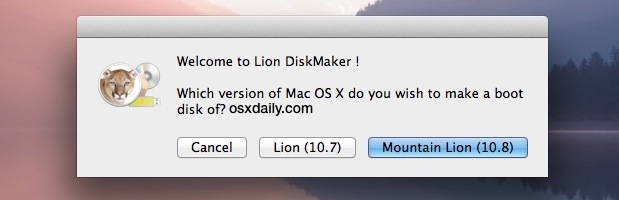
I came across a recommended piece of freeware names Lion DiskMaker, which takes the Lion install from the Mac Apps Store and via a couple of steps creates the bootable USB stick for you.

Lion DiskMaker - nice little app for creating bootable Moutain Lion media


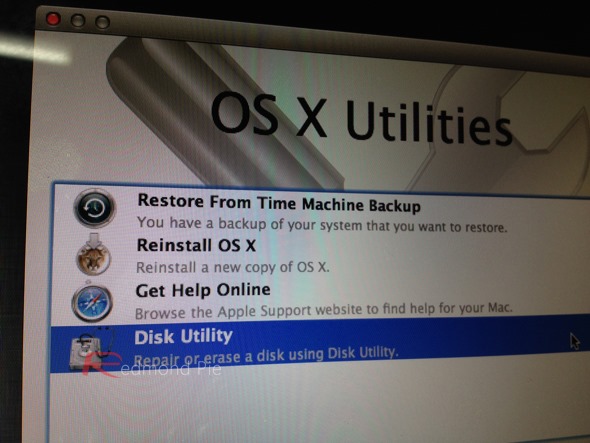
I fancied doing a late nighter, so after restarting the Mac holding down the Options key, I erased my partition and then moved onto installing Mountain Lion as a clean install.

The beauty of erase and install!


While its taken the best part of a day to reinstall apps and tweak my required settings, the mojo in my Mac is back. The spinning ball rarely seen and some proper snappiness has returned, even for a Intel Core Duo model from 2008.

Spring is the time to given our important things a good clean.

Friday, August 3, 2012

Streaming to the big screen

With recent announcements in relation to the availability of Hulu Plus on Apple TV, plus the addition of AirPlay Mirroring for newer Macs on Mountain Lion, it was a good moment to check where I am on options in cutting the cord from satellite TV here in the UK. The essential aim is to be able to access web content on the big screen, ahead of UK based TV schedules.

Of course, BSkyB is very powerful in UK & European market terms, both in its variety, with agreements with TV networks and film studios, alongside their unrivalled ability to content via set top boxes, mobile and even internet subscriptions. All with DRM and related encryption technologies thrown in to boot.

Previously, I had been playing with the Boxee box.  A decent product overall, with key features such as VPN configurability to be able to access US based services such as Vudu to get 1080p movies and film shows. The only downers being in terms of the price per throw for each movie (as opposed to a monthly all you can eat price).  A complimentary entertainment source is Hulu, in the form of the Hulu Plus service, designed for consoles and media streamers with HD content baked right in.  To date, Hulu Plus has not been available on Boxee, and given its niche numbers, I wonder if it ever will be. Without Hulu, Boxee is always missing something which really transform its value for non-US users.

So if you want to get access to your Hulu standard def shows outside of the US and Japan, you turn to the web with a VPN. Enter AirPlay Mirroring. However, Apple enabled AirPlay Mirroring only on their newer Macs, due to performance issues on older ones with the newer requirements of the technology. Thankfully, outside the Mac App Store, there are other solutions.

AirParrot is an app I mentioned previously. I tested it with my 2008 iMac on 2 favoured use cases which matter to me. Namely streaming football via FoxSoccerTV and then of course Hulu. The mirroring was to my 5 year old 37" Panasonic 1080i Plasma TV to check the quality.

AirParrot streamed content from iMac to Panasonic Plasma 1080i set

As you can see from the screen shot, the quality of the stream across the LAN produces a smooth image with much of the anti-aliaising built into the TV signal processing.  Of course, what it distinctly lacks is any real sharpness or detail. But given that the source is standard definition or below web source, this is hardly surprising.

What was even more interesting is how hard the iMac was working, both in terms of packets across the LAN and how heavily the iMac CPU was being taxed.

Courtesy of iStats menus - how the iMac was working hard to
use Airplay over AirParrot
AirParrot can also allow you to extend your desktop while mirroring content.  This provides additional value in terms of being able to watch your footy or TV shows on a mirrored screen while working on your main monitor at the same time.  Seeing how taxing this is on machine resources, I am mindful of the types of apps I'd throw for doing other stuff — e.g no heavy lifting apps such as image processing or CAD drawing.

So where does this leave me?  Well for us non-US dreamers of Hulu on Boxee or Apple TV, we can still use standard definition as we had all along as long as we put our money down on a decent VPN connection.  Of course, I can sign up to Hulu Plus for $8 per month (enabled by having a US Credit Card or PayPal and a bona fide US address) and then stream via AirParrot on the older iMac or use proper Airplay Mirroring fro the MacBook Air to the TV in the lounge.  In that scenario, I would have access to HD quality streams where available on Hulu.  Beyond that, I can only hope that Hulu finally shows up on Boxee.  It's been a long time coming, given its availability on most other console and media streamer platforms, but it would certainly tick all of my key boxes to think seriously about cutting the cord on UK satellite and cable TV services.

Saturday, June 9, 2012

Galaxy Nexus — Android Reloaded

Galaxy Nexus home screen
Up to recently, my only foray into owning an Android based smartphone had been the 2010 launched HTC Desire HD. This phone competed with both the iPhone 4 and the Samsung Galaxy S2. Beyond the original must tinker and personalise the device exactly as I want it mode, I found Android experience a relatively poor one. The screen was LCD and did not have the AMOLED sharpness and colour saturation so that video streams looked poor.  The battery was poor out of the box and required lots of notifications and tasks turned off just to get it through the day. It had 3 firmware update for Gingerbread, which made is progressively faster and more stable. This was important since HTCs add their UI in the form of HTC Sense, which is okay, but not great. Since 2010, it seems telling that from going from a large scale manufacturer of Android and Windows mobile devices, HTC are on a downward spiral.

Overall, with very few apps I really liked and could sync data easily with the Macs, performance which got slower over time (especially as I upgraded from iPhone 4 to 4S), I felt I had made the wrong call with Android. To that end, when the pure Ice Cream Sandwich Galaxy Nexus from Google came out in late 2011, I got interested in taking another look. This post is talking about what's broadly happened since I got it.

Light phone, good screen
The phone is surprisingly light and retains a good feel at 135g.  Build quality is affected by use of plastic for the outer case, but nothing that a thin, lightweight and grippable case cannot enhance. The screen is bigger at 4.65 inches diagonal, and resolution is at 1280 x 720 pixels with a PPI of  316. So not Retina, but not too far off either. The AMOLED screen type shows up warmer and more deeper colours and for me, more preferable images than the iPhone 4S (I did a side by side comparison using apps such as Fancy and Instagram). The iPhone 4S are whiter and in terms of contrast, but the overal image of the Nexus seems deeper and more natural. The battery has greater capacity than my previous HTC, and lasts through the day on a single charge while tinkering with it a lot throughout the day (this is not the same as playing videos, games or making lots of calls). And that's without changing anything out of the box. Lastly, with no actual hardware buttons this seems a shrewd move by Google as the back, home and task switcher buttons are now touch operated and change also with the screen orientation. Usability wise, I liked this, nice touch.

It's better in ICS
Using the Nexus from a software standpoint, dare I say it, is pleasant and quite enjoyable. I won't go into all the features in ICS, but of the notable things:

  • Design and polish of ICS is markedly better in an Android way
  • Animations and user experience is a lot smoother (for example, switching between home screens, task switching). In fact, it makes iOS look cumbersome and it need of an overhaul.
  • Much better keyboard, has better spacing for fast typing - feels as good as iPhone
  • Creating and editing groups on the home pages is easy, in fact changing them is easier than iOS
  • You can integrate your VoIP number into the main phone app, thereby choosing between a mobile call and an internet call - actually useful!
  • Chrome is now on Android (download from the Store) - quick and you already know how to use it.  Most importantly, it brings across your Bookmarks from your gmail set up
  • You can now easily take screenshots - through an iOS-like 2-button combination

Overall, this is a more mature version of Android. iOS has a real rival if we do without the Sense's or Touchwiz's of this world.

Apps still are my gripe
Of course, combine the hardware and the base software and in this case, you have a very capable smartphone. However, developer ecosystems are what really drive the platform in terms of its range, value and maturity. If you're like me, you've probably invested  considerable time, money and emotion on apps in the OSX and iOS world, some of which are simply not available in Android. Based on my own requirements, apps like Reeder, TweetBot, OmniFocus, Due, Jumsoft Money, MoneyWiz and Due are some of the ones I cannot do without if I was ever considering a switch. There are others which are available and make the thinking of a switch more of a margin call.  They include include Evernote, Instapaper, The Times, The Guardian, Amazon, Ebay.

When I first started writing this section, I was convinced that rather like my HTC and Gingerbread experience, I'd be bemoaning both the range and quality of such key apps. I expected to moan about the design, UI and overall experience.  The problem is, I've been forced to re-evaluate this position. In many cases, running the iOS5 and ICS versions in a side by side comparison, revealed how the quality of Android apps have improved to the point of being consistently comparable to their iOS counterpart.  Take Facebook, Google+, Zite, ZeeBox and Fancy examples.  Sure, in some cases and I'm looking at Amazon and eBay, they appear like cheap cousins of the iOS brethren, but in the main, I was surprised how much Google and Developer effort has improved the overall Android app experience, especially on this handset.  Of course, for those apps which are not on Android, you get to look up and find good alternatives. gReader Pro, TweetCaster as very usable counterparts to Reeder and TweetBot. Not as good, but certainly a solid experience.

Wifi oddities
One thing stood out, which I did need to do some checking on. Connecting to my Billion router access point, was for unexplained reasons, poor. The first sign was Speedtest.net would drop out ('Communication Failures') from time to time, which would happen even if I was beside the router. Given this is a 55mbit fibre line, picking up 6mbit is kinda suspect. You can do some digging around the various forums to find similarly reported experience from other Nexus users. It seems some sort of issue between the Broadcom chip and ICS where the signal dependent on the access point being used, is prone to drop out. Having said that, it seems to perform better on the Airport Extreme access point at 2.4Ghz, registering 25-30mbit download speeds consistently. The 5Ghz access point did not picking up, even through the Broadcom chip should pick up the 5Ghz as a preference.

Other bits
Apps and Wifi  aside, other things I picked up were minor. For example, text height is taller on the Nexus, probably because of the screen size and aspect ratio. Given the growing evidence of a 4 inch iPhone screen in the forthcoming iPhone 5, I hope Apple do not also fall into the trap of the taller text to accommodate screen sizes and aspect ratios, as I like its overall appearance. There are other UI idiosyncrasies with ICS, like the inconsistent appearance of the settings/options panel, but as I said these are minor to be fair, do not detract from the overall positive impression I've had using the Nexus and ICS.

ICS is a real step up
I really like the Nexus and ICS. I've been reaching for it a lot. It's easy to pick up and easy to use if you are familiar with Android. It's fast, and is directly comparable to iPhone 4S snappiness in use. I really like the screen and surprised as I am in saying this, I prefer the colour tones to the 4S. The 4.65inch screen is too large to do everything in one hand, but while it's not perfect, I'm find it useful to have the larger screen estate when using specific apps.

I hope apps continue to improve in UI and overall polish. If they can continue to bridge more popular iOS apps such as Flipboard (which is currently an exclusive for the Galaxy S3, but will be on general release soon), then this brings iOS devotees like me, closer to having a harder choice. And did I say using this phone and software is seriously quick?

I think is that it's important to understand that Google while copying Apple and iOS, seems to be on its own path in terms of design and the Google brand. This is good to see, and I'm looking forward to the next software release. Especially as a pure Google handset, as I'm free of the shackles of telco's, and their add-on interfaces.

Would I recommend this Galaxy Nexus? Absolutely. An iPhone 4S replacement? Not for me, but I like the fact that the gap is closing. We just need to see more support for Android from the major developers on iOS. Of course, the drivers and reasons for this to happen is a whole other discussion.


Monday, April 9, 2012

Moving a MacBook on — doing it right

In taking on the MacBook Air, I needed to shift the older black MacBook from late 2008. A solid  performer, but it was heavy and could not be expanded any further without considerable expense. And with SSDs and Intel Core i5 or i7 processors now widely available, it was starting look long in the tooth. Ordinarily, that was all fine, but when Apple says that many features of Mountain Lion will not make the cut for a machine which is less than 4 years old, you know it's time to reach for the resale door.

Of course, the laptop was always carefully looked after to maximise future resale value.  It actually sold for 55% less than I paid for it, which in itself if amazing given the rate of technology change in general. In preparing for its sale, there were 2 things I wanted to ensure:

  1. It handed down to the next Mac user still imputing quality by providing them a brand new Mac experience
  2. My data and applications were wiped in the process

In the past, based on Leopard or Snow Leopard, this would be easier to do with the install and wipe options on the OSX DVDs. In this case of Lion, not so as there is no longer any install media supplied. A quick search around identified a range of articles to achieve the goals in mind. I used this one since it had the fewest number of Terminal steps to follow.

Voila - all worked nicely. Thanks to Mark for his checks and observations on the Terminal commands.

The upshot is that while the data on the hard drive has not truly been securely trashed to full disposal standards, the terminal commands pretty much delete the admin user data while avoiding having to do a full reinstall of Lion. Of course, there is a chance that the data could be recovered through the likes of DiskWarrior, but I would say that a) new MacBook user would be unlikely to do that, b) I have the buyers address anyway ;-) and, c) if the buyer lost it to an expert user, then perhaps there's a data loss issue. A risk I'm willing to accept.