Showing posts with label Utilities. Show all posts

Sunday, February 17, 2013

Spring clean install

Despite my efforts with the likes of DiskWarrior and Techtool Pro, my iMac 2008 had been running like a dog recently. Lots of spinning beach balls for event the most basic of task such as running the Finder window to find an application, made me realise that after upgrading from Leopard > Snow Leopard > Lion > Mountain Lion over the last years, the Mac was in desperate need

After I got over my laziness to do it, I finally checked round the web to get myself ready. TimeMachine and SuperDuper! backups were in place and tested for select file restores. The new thing was to create a bootable image for Mountain Lion in the first place.

I came across a recommended piece of freeware names Lion DiskMaker, which takes the Lion install from the Mac Apps Store and via a couple of steps creates the bootable USB stick for you.
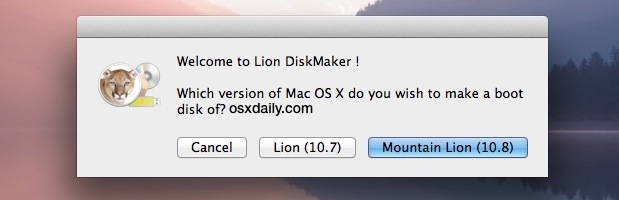
Lion DiskMaker - nice little app for creating bootable Moutain Lion media


I fancied doing a late nighter, so after restarting the Mac holding down the Options key, I erased my partition and then moved onto installing Mountain Lion as a clean install.
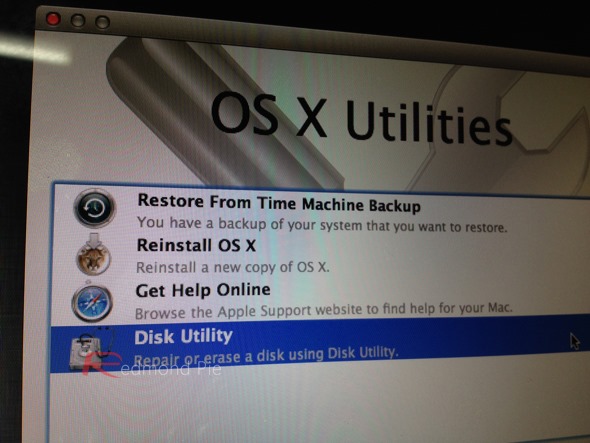
The beauty of erase and install!


While its taken the best part of a day to reinstall apps and tweak my required settings, the mojo in my Mac is back. The spinning ball rarely seen and some proper snappiness has returned, even for a Intel Core Duo model from 2008.

Spring is the time to given our important things a good clean.

Friday, August 3, 2012

One for the toolkit – DiskWarrior for the new MacBooks

Since replacing the Macbook recently with the 11.6 Air, I had noticed that beyond the clone backups and the cloud syncing, if the worst should happen with the on board SSD, I'd have no DiskWarrior get out clause.

A quick surf around what Mac users with the no optical drive on the Macs do in this scenario, revealed a relatively straightforward answer which I thought I would share:

  • In this case, use a Mac which does have a SuperDrive on board
  • Insert the DiskWarrior DVD into the SuperDrive
  • Insert a good quality USB key (probably 2-4Gb storage) into the Mac
  • Fire up Disk Utility
  • Format the USB key as 'DiskWarriorDVD' to get it ready
  • Move to the Restore tab
  • Drag the DVD of DiskWarrior to the source field
  • Drag the USB drive of the DiskWarriorDVD to the destination field
  • Click Restore

Simply use DiskWarrior to create a bootable USB key for DiskWarrior
— perfect in the toolkit for the new MacBooks

That's it. Store the USB key somewhere you can remember.  If the worst should happen and the MacBook does not fire up.  Insert the USB key and press and hold Cmd + O until DiskWarrior has fired up.

Toolkit updated :)

Sunday, July 8, 2012

Home maintenance

In the last few months, I'd noticed an increasing number of system freezes on my iMac 24 from late 2008. As you will all know, these sorts of things feel generally random and happen at the wrong time when producing or creating something - so they are especially annoying.

The odd one every few months is okay, but in recent weeks web browsing, on-line gaming with Football Championship Manager or editing in iBooks has seen a frequency of freezes get to the stage of being particularly troublesome and worrying. My overall aim for the iMac 24 is to see it through the next 12 months into 2013 (dreams of a retina display iMac + SSD). This summer it will see its fourth OS upgrade in the form of Moutain Lion, and the Mac will probably be a a bit slower again as  result.

Wondering if something was up, it was time to run the key checks on the disk and other subsystems. In terms of quick checks, I did the usual repair permissions with Disk Utility.  But another freeze occurred afterwards,which suggested to me with all the spate of freezes which required power recycling, I'd need to do a directory rebuild using DiskWarrior.   Since doing that, the iMac has felt a bit snappier.

DiskWarrior is an essential utility and well worth the investment

I also took the opportunity to upgrade TechTool Deluxe which came with AppleCare to TechTool Pro 6, which now provides a range of background preventative monitoring tasks as well as range of test across al subsystems across the machine (disk, memory video memory,etc).  It's certainly a comprehenisive tool and again another one worth the considered investment in self-maintenance before calling for the vendor repair option.


TechTool Pro 6 is a worthy tool for a wider range of tests
So far, so good. Beyond, some directory damage to some minor directories, all looks good.  From a browsing standpoint, I decided to disable Flash on Chrome and leave it available on Safari when I do need to watch Flash based content.  It's good to know that HTML5 video has come on leaps and bounds as the preferred video content standard since the advent of iOS and Android devices.

So, time will tell if this has made the difference and if I'm sitting on a major hardware failure. While a disk verification runs in my scripted SuperDuper backup clones of my hard drive on a monthly basis, I think a quarterly directory rebuild in DiskWarrior is the task I'll add to my schedule from now on.