Showing posts with label Sonos. Show all posts

Sunday, July 7, 2013

Sound bars reloaded – the Sonos Playbar

Make no bones about this - this is a seriously impressive 5.1 surround system

It's been 18-months since my first post on this blog, when I started with a look the Bose Cinemate 1SR which saw me move on to the Yamaha YSP220 sound bar. Since then, the Yammy has been a solid performer for my Sky TV, media streamers (Apple TV, Boxee, Airplay on a Mac). As a wired single box and sub solution, it did the trick and has added much enjoyment to my movie, sports and general TV watching.

As a solution for music playback, it failed miserably.  I did try putting a Sonos Connect on it to use it as a zone, but unfortunately, it exposed the Yammy's focus on cinema digital sound processing (DSP), which even when disabled, is very unsuited to listening to music.

Since Sonos released the Playbar earlier in 2013, and it being warmly received by the media, the question of course was, how would it fare against the Yammy and would I want one longer term.

Reading the more technical reviews, the key blocker for me was would it  process 5.1 audio from my inputs to recreate a fully 5.1 sound field.

As normal for me, my aim here is not to extensively review the Playbar per se, but for interested readers, talk about my experience with it, vis-a-vis being an existing sound bar owner.

Bulky but luxurious build

Compared to both the Bose and Yammy, the Playbar has a larger form factor and dare I say it, feels bulkier. It's height may be a problem for some TV sets, given the dimensions of a TV's fit and lower screen in relation to the height of the Playbar.

That said, as you'd expect from Sonos, it has a luxury feel and strong build quality.

Simplified setup

Thinking back to the Bose and Yammy, the set ups for both involved reading instructions and running through calibration routines with accessories to optimise the virtual surround modes which both systems employ. The Bose uses the Sonos approach which is to focus on sound integration via co-axial or optical (Toslink) inputs.  Unfortunately, it cops out and does not go further with integrating with TV set remotes, and instead decides to supply its own remote, which fails itself as it provides no visual indication on the sound level when in use.

The Yammy on the other hand, acts like an AV receiver and requires all HDMI sources to route through it and a HDMI output via the ARC channel. It's advantage is that for switching sources, you can simply press the input button on the sound bar. It's disadvantage is that Sky HD copy protection does not allow switching capability when you've chosen another source.  A compromise being reached when you need to use your TV remote to forcibly switch HDMI back to the Sky input.  Beyond that, the Yammy works very well, has been cited for UK home cinema awards and for the price is unbeaten for a 3.1 Dolby Digital and DTS surround system.

In a very Apple-esque way (in fact a wonderfully Sonos way), Sonos have aimed for simplicity and it must be said, really cracked it. In both 3.0, 3.1 and 5.1 set up, setting up the Playbar by itself, or alongside the Sub and Play 3 surrounds is gorgeously easy. Using the iOS app, includes a deceptively simple set of steps for the Playbar to learn the remote of both my Sky+ remote and my Sony TV.

It's the small things

My main technical requirements check was to understand how the Playbar would work with my existing kit in terms of processing stereo and 5.1 discrete audio via its optical digital input.

As luck would have it, my Sony 40 inch 1080p panel outputs Dolby Digital 5.1 via optical. Even better luck my Samsung DRX890 Sky HD+ satellite receiver must have received a software update some time ago to output Dolby 5.1 over HDMI. The screenshot below is how you know:

In the UK, Sky has released a software patch to enable
Dolby Digital over HDMI - a real boon for the Playbar
This is important because it meant that Sky, the Apple TV, Boxee box and my Blu ray would pass the 5.1 Dolby Digital (DTS audio is not supported on the Playbar - at least not yet) and voilĂ  straight into the Playbar.

Other niceties include wireless IR sensors which work to transmit the remote signal through the Playbar to the TV. The Yammy uses a wired approach which is flimsy to fix on to your TV.

Seriously impressive sound

My experience of the Playbar varied dependent on the setup. My own usage has been either paired with the Sonos Sub as 3.1 solution or more recently as a full 5.1 solution when I added as pair or wall mounted Play: 3's (using the very good Flexon brackets)

The sound is bigger, bolder, more naturally open and detailed that the Yamaha YSP220 sound projector. This may be as a result of the removal if the digital sound processing you historically find in Yamaha receivers.

The gain on the Playbar is considerably louder. I barely get up to volume 10 during the day and hover around levels 3-5 during the evening. A night-time mode is one screen press away to compress the dynamic range for late night watching when you live with others. A speech mode also adds gain on the dialogue which sits on the centre channel for those moments when your partner tells you they can't hear the on screen dialogue :)

For both music and TV, this is undoubtedly the best solution I have ever experienced. Even thinking back to the Laser Disc and early US DVD days of the late 1990's, paired with the Yamaha DSP3090 king of an AV amp and a 5.1 wired speaker in those days (B&Ws of course), I've can't remember even being so satisfied with both the performance, portability and convenience of setting it up.  The fact that the sound is delivered wirelessly I consider an astonishing feat of engineering.

If you're a Sonos lover

This is a no brainer. Get one, immediately if you have a Sub and want to add enjoyable grunt to your TV, Movie and Music playing experience.

If you're looking around for a Playbar, then on it's own, this is expensive and the Yammy can be considered a better match for pseudo 5.1 system which also supports a sub woofer.

For everyone else

From a 3.1 comparison standpoint, the Playbar + Sub sits in the Bose price range. By the time you add the Play: 3's as surrounds you're in the luxury mid to higher end area, As in many cases, you get what you pay for. If you can stretch to the Sonos + Sub + Surrounds, you're going to love this.




Wednesday, August 8, 2012

The problem with Airport Networking is that it just works

The often experienced problem with tinkering is that in the process you screw things up and have to figure out how to put all back together again. Of course, it's the process of rebuilding things which leads to new insights and improvements. In this scenario, this was all about Airport home networking tinkering.  The aim of the tinkering was to do 3 things:

  • Maintain a 5Ghz wifi network for all my smartphones, tablets, Macs, Media streamers and Windows PCs
  • Ensure it was a roaming network for each device to pick up the best signal, regardless of where it was being used in the house (3-floors)
  • Get the Airplay playback to Sonos less prone to drop out because it was connected to my 2.4Ghz wifi network

Sonos Airplay

Using the previous version of Airport Utility (5.5.6), it was very easy to add Airplay to Sonos to throw iOS device music at the different Sonos zones. While the wifi radio on the 1st generation Airport Express was turned off, I did configure it to join the 2.4Ghz wifi network running off my Billion router. Playback on the Sonos Airplay was patchy in that it would consistently cut out the signal at various points in the playback of any tracks from my iPhone.  It made no difference for which zone it connected it to and which iDevice I used. I had the same symptom of issue with Rogue Amoeba's Airfoil which I shared previously. Given that Sonos creates it own optimised mesh network to optimally playback wireless music, my suspicion was that this had to do with the Airplay part going over the 2.4Ghz network where throughput is renowned for being choppy, regardless of any channel I chose.

The 5Ghz network
The initial idea was to add 2 Airport Expresses to the 5Ghz network (Airport Extreme – 'AExt') which would add coverage to black spots in the house, due to the shorter ranges covered by the 5Ghz mode.


I set up the first 'AExp' (for the lounge) using the 'extend wireless' option for the main 5Ghz network and it was operating fine.  Issues started to happen when I tried to add another AExp (for the loft) wirelessly in the loft to similarly extend the wireless network. At first, the wireless connection simply would not pick up. After a few soft resets, I managed to get it to pick up via an ethernet connection.  Then I found it was operating the extended wireless network at the 2.4Ghz which went against my aims. I ended up setting up another wireless access point with a different name to ensure I could get the 5Ghz mode which I wanted. Less than ideal.


What I learned from this was a subtle difference between Creating and Extending a wireless network with Airport Utility. While extending is fairly obvious, Airport Utility can actually extend your network by using the Create a Wireless network option. In this instance, the new access point  simply adds new 2.4 and 5ghz channels to the same access point name. In this regard, it optimises the wireless performance of the AExp where it is located, instead of forcibly making it run to the channels of its parent base station.  The result is a change as in the screenshots below. Loft AExp – tick.

Initial set up for additional base stations
- wired and wireless

So I returned to the Lounge AExp and thought it would be relatively easy to change the connection from wireless to wired by simply adding the ethernet cable to the switch where it was located.  What I found was somewhat strange - it seemed to cause a network storm and take down the Internet connection.  Take the ethernet cable out, and in a few seconds, all access points and the internet were back.

I suspected possible causes of this easy repeatable were either IPv6 LAN traffic enabled on the Billion and being automatically picked up on the AExt and AExp's.  So I turned this off and plugged in the ethernet cable again.  All connections went down again.

Then I realised 
 the magic of the Airport products, is that you need to soft reset them and run the Add a new base station routine in Airport Utility. Voila, it worked. 

Throughput wise (and concentrating on 5ghz), it has been beneficial. The rather hidden 'hover over' feature in Airport Utility (Mac) shows solid connection rates for each piece of kit. For example — iPhone at 52Mbps, Galaxy Nexus 39-65Mpbs, Apple TV 3rd gen 65Mpbs, Apple TV 1st gen 162-270Mbps, MacBook Air 162-270Mbps.


Results wise, I have 3 base stations connected by ethernet, using the same access point name across each floor, each with support for 2.4Ghz and 5Ghz support. The only difference between them is the channels being used for 2.4 or 5Ghz modes.  In effect, Airport Utility has optimised their radio signal as per their respective location.

Back to Sonos Airplay
Using the same principle of soft reset to re-run the set up routine for the 1st gen Airport Express, it is also connected by ethernet to my Sonos Play S5 in the lounge, with the wireless turned off.  When I airplay audio from the iPhone or the iPad, it works – flawlessy.

So the final Airport base station network now looks like this.


All ethernet wired base stations
- even Airplay with Sonos, which plays nice!

Morale of the story?  Use ethernet for connecting each base station to your network. Get HomePlugs and Switches if you have to, and while it will cost extra, it makes for a more satisfying device connection and playback performance across the entire network.

A couple of other points of note.  TidBits editor, Glenn Fleishman's video on Airport Utility is a great introduction on the latest how to on Airport Utility.  I go even further and recommend his book available in ePub, Kindle or iBooks which goes into extra detail for running and configuring Airport product networks at home or in the office.  Recommended.


Friday, December 30, 2011

Streaming audio wirelessly around the home

My Sonos wireless music system is one of the best gadgety things I've bought in recent years.
Now I have 4 rooms around the house where I can stream my choons.

As I listen to a lot of radio — like TV programmes, I can't always be there to listen to it at the time. As a soul music nut, it's a great source of getting new choons to stream over Spotify, Last FM or iTunes on the Sonos.

First off, I got curious around Airplay over Sonos.  I thought this would  be good to throw audio from my iOS device to the Sonos rooms without the needs for buying extra Sonos gear.  The Airport Express wired to a Sonos Play:5 solution works pretty well.  It is prone to irregular sound drops from time to time.  I think this is related to the number of hops the connection has to make over the main home wifi and the Sonos mesh.  Tip of the day — Connect the Airport Express to the Sonos zone you will mainly use for more consistent connected performance.

Going back to the radio thing.  I use some cool software on my Mac by Rogue Ameoba. I use Radioshift for Mac to schedule recordings of shows I like to playback later. Mainly Solar Radio. (Note that Radioshift is no longer available).  I then use the Fission app to open the MP4 file of the show I recorded and edit out tracks I want to keep. Then export to iTunes to sync with the iOS device or be part of the Sonos connected music iTunes library (which is all stored on my NAS drive anyway).

An article appeared on Ars Technica, extolling the virtues of Rogue Ameoba's other product for streaming audio wirelessly around the home - Airfoil.  This was the piece I was looking for (instead of wiring in a 3.5mm stereo between the Mac and my Sonos Play:5). When playing back the audio from Radioshift, Fission or any other audio touting app on the Mac, Airfoil connects it to the Sonos Zones via the Airplay connected Apple Express.

Again, reliability is not 100% as any wireless activity on the home network seems to cause problems with the quality of the streaming. Probably a clash of packets. I do get tempted by the wired connection from time to time.

So in essence, if you have a Sonos system:

  • Airplay is worth exploring via a connected Airport Express to a Sonos Play:5. It's great to throw audio  from any iOS connected device to the one or more Sonos zones. Nice for parties :)
  • If you have audio stuck on your Mac (or Windows if you have to), Airfoil is a nice complement to getting Mac audio streamed around the home.

Worth it?  IMO yes, each of the products mentioned are relatively inexpensive and are well designed and easy to use.  And I'm sure I'll find other useful ways of using this as I tinker with it.

Of course you can see that Airfoil is a temporary solution, as Apple are likely to be baking in this functionality in a future release of OSX.

Thursday, November 17, 2011

Dangers with buying tech on a whim

I've had a Sony LED TV for a number of months now.  One of their Smart TVs.  Have been very happy with it and works very well.  Sound is much weaker and "tinny" compared to my Panasonic Plasma of a few years back, but good lord, the Sony is a lot cheaper to run.

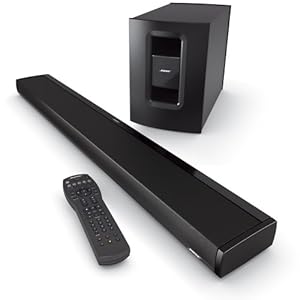
So while out with the missus one weekend, I ended up buying a soundbar for the TV.  I got the recently announced Bose Cinemate 1SR model.  


The Bose Cinemate 1 SR - good package, let down by some feature shortcomings and the price


Nice unit, minimalist design, has wireless sub and they got me in the store 'cos they played a scene from the last Star Trek movie which demo'd to me how much of a better soundstage I would have at home using one of these.  The unit had a clunky learning remote which I could deal with, but I quickly latched on to turning the sound bar into a Sonos zone as I could connect a ZP90 to either the optical or coax digital inputs.

Mind you, the damn thing was expensive.  But off I went home, hooked it up and was reasonably satisfied with the sound via Sky, Apple TV (v1), and Blu-Ray discs.  The fun started, when I tried to connect to it to my Sonos system.

Cut a long story short. It turns out that the Bose inputs are a bit different to what you would expect.  While it has analog, optical and coax TV inputs, alongside Auxillary optical and coax, it only uses the one with the best quality signal.  Therefore, to hook up the Sonos to play music through it, either a) the TV is off and therefore not feeding an optical signal to the soundbar or b) you add an optical switcher like this one to direct one signal to the soundbar.  Bit of a pfaff, but I got it working.  

Most of all, very miffed to spend more than a grand only to add a workaround afterwards.

My fellow geeky mate in the office had been suggesting the Yamaha YSP-220 while I was doing all of this.  


Yamaha DSP-220 - the affordable sound-bar for the cinephile


I was resistant at first, but given the Bose was on a 30-day trial, I decided to give the Yammy a go. It's a full AV switching unit and unlike the Bose, it does all the signal processing inside the box. Therefore, the Sonos integration worked straight away. 

Even better, it adds the widely regarded Yammy Cinema DSP modes, a host of other features and uses such as automatically turning off the TV speakers and routing sound via the Yammy instead.  This means no need for a separate remote as the family uses the one Sky+ remote to work the TV and satellite.  And most of all, it cost £500 less and sounds as good, if not better.  Yes, you read that right.  Only downside was the wired sub, but that is now behind the TV and cabinet.

You know what happened next right?

So morale of the story, if you do buy stuff on a whim, make sure you have a no quibble return period agreed up front.  Otherwise, do your research first when buying stuff:)